Hogwarts Legacy DLSS 5 Settings Guide: How to Enable It and Best Settings by GPU (2026)
Hogwarts Legacy adds DLSS 5 on Nov 5, 2026: supported RTX 50 GPUs, how to enable Neural Rendering, best settings by GPU tier, NVIDIA benchmarks and known issues.
TL;DR: Hogwarts Legacy gets a free update on November 5, 2026 that adds DLSS 5 (3D-Guided Neural Rendering). It is the second game with official DLSS 5 support, after NBA 2K27. You need a GeForce RTX 50 desktop or laptop GPU, an RTX Spark PC, or GeForce NOW Ultimate, plus Game Ready Driver 621.14. To turn it on, open the in-game graphics options and enable Neural Rendering. Then pair it with DLSS Super Resolution, Multi Frame Generation, Reflex and, if ray tracing is on, Ray Reconstruction. Avalanche tuned the effect for environments, tone and skin structure, so the lighting changes while character faces keep their look. NVIDIA's own numbers, with 6X frame generation, go from 225 fps (RTX 5060 Ti, 1080p) to 372 fps (RTX 5090).
What the November 5 update adds
| Item | Detail | Source |
|---|---|---|
| Release date | November 5, 2026, free update for Hogwarts Legacy on PC | NVIDIA |
| New feature | DLSS 5 with 3D-Guided Neural Rendering, shown in the menu as "Neural Rendering" | NVIDIA |
| Other DLSS tech | The game's other DLSS technologies are upgraded to their newest versions in the same update | NVIDIA |
| AI model | The October 2026 DLSS 5 model, about 118M parameters (24% smaller). NVIDIA says it uses 20% less VRAM at 4K and runs 2X faster than the first model | NVIDIA |
| Tuning | Avalanche's Jose Villeta (Director of Software Engineering) says the team tuned "environments, tone and skin structural parameters". NVIDIA calls the result an environmental uplift "while preserving character identity" | NVIDIA |
| Driver | GeForce Game Ready 621.14 WHQL (Nov 4, 2026, US) adds DLSS 5 support for Hogwarts Legacy and War Thunder | NVIDIA release notes, Wccftech |
| Official DLSS 5 games | 1) NBA 2K27, live since Sep 3, 2026. 2) Hogwarts Legacy, Nov 5. Next: War Thunder (Eagle's Shadow update, mid-November) and Where Winds Meet (from Nov 23) | NVIDIA, PC Gamer |
Patch notes: As of the morning of Nov 5 KST, Warner Bros. Games and Avalanche have not posted their own patch notes on the game's Steam news feed. Everything in this table comes from NVIDIA and the driver release notes. We will add the studio's notes once they are published.
Why the "faces don't change" part matters
DLSS 5 drew heavy backlash in March, when early demos gave characters a reworked, "yassified" look. Hogwarts Legacy's version is tuned to change lighting, materials and tone while leaving character faces alone. PC Gamer's comparison shots show faces staying essentially the same, and its writer concludes the developers most likely masked them out (PC Gamer). This is possible because the DLSS 5 SDK gives studios Structure Intensity, Tone Intensity and semantic masking controls. For background on the model change, see our DLSS 5 October update explainer.
Supported GPUs
| Hardware | Official DLSS 5 in Hogwarts Legacy? | Notes |
|---|---|---|
| GeForce RTX 50 desktop (5090, 5080, 5070 Ti, 5070, 5060 Ti, 5060, 5050) | Yes | Driver 621.14 or newer |
| GeForce RTX 50 laptop GPUs | Yes | NVIDIA lists RTX 50 laptops for launch |
| RTX Spark PCs | Yes | Listed by NVIDIA for launch |
| GeForce NOW Ultimate | Yes | The only official route for anyone without an RTX 50 GPU |
| RTX 40 / 30 / 20 | No | Not supported in this update. Community mods exist but aren't official (see our RTX 40 guide) |
| AMD Radeon / Intel Arc | No | DLSS is NVIDIA-only |
Hogwarts Legacy's own Steam requirements are unchanged: minimum GTX 960 4GB, i5-6600 and 16GB RAM; recommended GTX 1080 Ti, i7-8700 and 16GB RAM; 85GB of SSD space. DLSS 5 is an RTX 50 feature that sits on top of those. The full list of supported games is in our DLSS 5 supported games list.
How to enable DLSS 5 in Hogwarts Legacy
- Update the driver to GeForce Game Ready 621.14 or newer through the NVIDIA app, or download it from nvidia.com.
- Update the game. Steam, Epic or another launcher will download the Nov 5 patch.
- Remove any DLSS 5 mods. If you used OptiScaler or another community DLSS 5 injector before launch, delete its files from the game folder and run Verify integrity of game files on Steam. The official path and the mod both hook into the same DLSS pipeline.
- Launch the game and go to Settings → Graphics Options, where NVIDIA's guide puts all of the following.
- Set Upscale Type to NVIDIA DLSS Super Resolution.
- Turn on Neural Rendering. This is DLSS 5.
- Set Frame Generation to DLSS Multi Frame Generation and choose a multiplier.
- Set Low Latency Mode to NVIDIA Reflex. Use "On + Boost" if you're CPU-limited.
- If you play with ray tracing on, turn on DLSS Ray Reconstruction.
NVIDIA recommends steps 5–9 together (NVIDIA).
Benchmarks: NVIDIA's official numbers
NVIDIA's test system used a Ryzen 7 9800X3D, 64GB RAM and Windows 11. Settings were maxed with ray tracing on, DLSS 5 on, Multi Frame Generation at 6X and Ray Reconstruction on. Super Resolution was set to Quality at 1080p and 1440p, and Performance at 4K. These figures include generated frames.
| GPU | 1080p (SR Quality) | 1440p (SR Quality) | 4K (SR Performance) |
|---|---|---|---|
| RTX 5090 | 372 fps | 371 fps | 302 fps |
| RTX 5080 | 366 fps | 286 fps | 206 fps |
| RTX 5070 Ti | 352 fps | 252 fps | — |
| RTX 5070 | 294 fps | 205 fps | — |
| RTX 5060 Ti | 225 fps | — | — |
Source: NVIDIA GeForce News, Nov 3, 2026. A dash means NVIDIA didn't publish that combination.
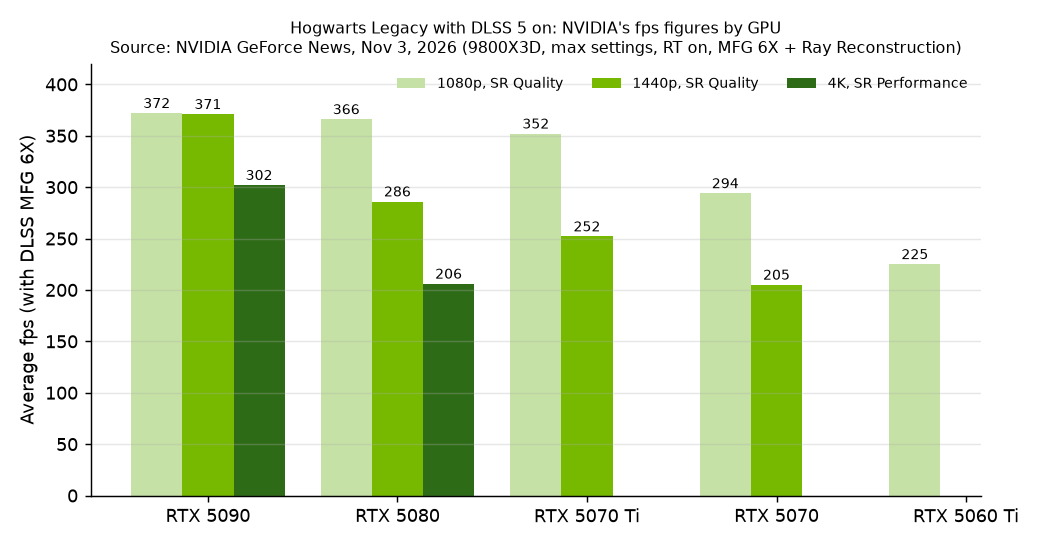
At 6X, only about one frame in six is rendered. Dividing by six gives a rough rendered frame rate: about 50 fps for the RTX 5090 at 4K, about 48 fps for the RTX 5080 at 1440p and about 37 fps for the RTX 5060 Ti at 1080p. Input latency follows that rendered rate, so the tier settings below aim for it, not for the headline number.
Pre-release community test: what DLSS 5 itself costs
Before the official patch, Tom's Hardware tested Hogwarts Legacy with the September DLSS 5 model injected through OptiScaler. The settings were 4K, DLSS Performance and maximum ray tracing, with no frame generation.
| Card | Performance hit with DLSS 5 | Board power off → on | Source |
|---|---|---|---|
| RTX 5090 Founders Edition | -49% (about 121–124 fps → about 63 fps) | 417 W → 547 W | Tom's Hardware |
| RTX 5090 Lightning Z | -42% (about 73 fps with DLSS 5) | 480 W → 720 W | Tom's Hardware |
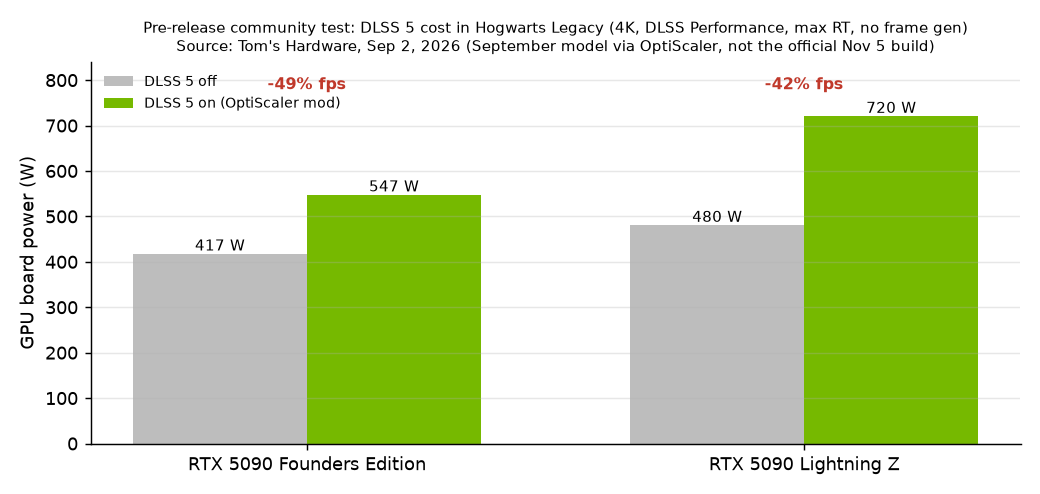
This test used the older, heavier model through an unofficial injector, so treat it as a worst case. NVIDIA says the October model is 2X faster. NVIDIA also told PC Gamer that DLSS 5's performance cost in NBA 2K27 dropped from about 60% to about 30% with the new model. Plan on roughly a 30% hit to rendered fps in the official build until independent benchmarks come out. Power draw is covered in more detail in our DLSS 5 power usage breakdown.
Recommended settings by GPU tier
The goal is a rendered rate of about 50 fps or more before frame generation. Then pick the MFG multiplier that brings you close to your monitor's refresh rate. A higher multiplier than your display can show adds latency with no visible gain.
| GPU | Resolution | Super Resolution | Frame Generation | Notes |
|---|---|---|---|---|
| RTX 5090 | 4K | Performance (Balanced if 120Hz) | MFG 3X for 144Hz, 4X for 240Hz | NVIDIA's 4K Performance test averages 302 fps at 6X |
| RTX 5080 | 4K or 1440p | Performance at 4K, Quality at 1440p | MFG 4X | At 4K with 6X, it renders only about 34 fps. 1440p Quality feels better |
| RTX 5070 Ti | 1440p | Quality (Balanced if you want more headroom) | MFG 4X | 252 fps at 6X is about 42 fps rendered |
| RTX 5070 | 1440p or 1080p | Balanced at 1440p, Quality at 1080p | MFG 3X–4X | 205 fps at 1440p 6X is about 34 fps rendered, so drop one quality step |
| RTX 5060 Ti | 1080p | Quality, or Balanced with RT on | MFG 3X–4X | 225 fps at 6X is about 37 fps rendered. Consider turning ray tracing down to Medium |
| RTX 5060 / 5050 / laptops | 1080p | Performance | MFG 3X | Not benchmarked by NVIDIA. Watch VRAM on 8GB cards and turn texture quality down to High if you see stutter |
| RTX 40 and older | — | — | — | Use GeForce NOW Ultimate for official DLSS 5 |
These are our recommendations, worked out from NVIDIA's published fps. They are not settings published by NVIDIA or Avalanche.
Known issues
| Issue | Status | Source |
|---|---|---|
| Driver 621.14 open issues | NVIDIA lists none ("N/A") for this release. The driver also fixes video playback freezes and black screens on some RTX 50 / RTX Spark systems after 621.01 | NVIDIA release notes |
| Official game patch notes | Not yet posted by WB/Avalanche on Steam as of Nov 5 morning KST | Steam news, Hogwarts Legacy |
| Leftover mod files | Community DLSS 5 builds showed ghosting with MFG in HDR (OptiScaler issue #73). Remove the mod before you use the official toggle | GitHub |
| Higher GPU power | In the pre-release tests, DLSS 5 pushed RTX 5090 board power up by 130–240 W. Check your PSU and 12V-2x6 cable seating | Tom's Hardware |
| RTX 40 owners | No official support. GeForce NOW Ultimate is the sanctioned route | NVIDIA |
Player interest is still mixed. In a PC Gamer reader poll, 65% said they weren't interested in DLSS 5 and 17% were waiting for official releases like this one (PC Gamer).
Bottom line
On an RTX 50 card, install driver 621.14, update the game, turn on Neural Rendering and pair it with DLSS Super Resolution, MFG and Reflex. Choose the Super Resolution mode that keeps your rendered rate near 50 fps. On RTX 40 or older, the only official way to try it is GeForce NOW Ultimate.
Sources
- NVIDIA: Hogwarts Legacy & War Thunder add DLSS 5 (Nov 3, 2026)
- NVIDIA: DLSS 5 faster AI model, Hogwarts Legacy, RTX Spark laptops
- NVIDIA GeForce 621.14 WHQL release notes (PDF)
- Wccftech: Game Ready driver 621.14
- PC Gamer: Hogwarts Legacy's DLSS 5 update keeps it away from characters
- Tom's Hardware: early DLSS 5 performance with community mods (Sep 2, 2026)
- TechPowerUp coverage
- Hogwarts Legacy on Steam
← Back to all posts