H3 at 1088×1920 on a 16 GB Card — and the Line That Kept Pulling the Camera Down
MiniMax H3 renders full portrait resolution on a 16 GB GPU with two memory-splitting nodes, beats LTX 2.5 on detail and motion, and a chained shot only behaves once each segment's scene text matches what is on screen.
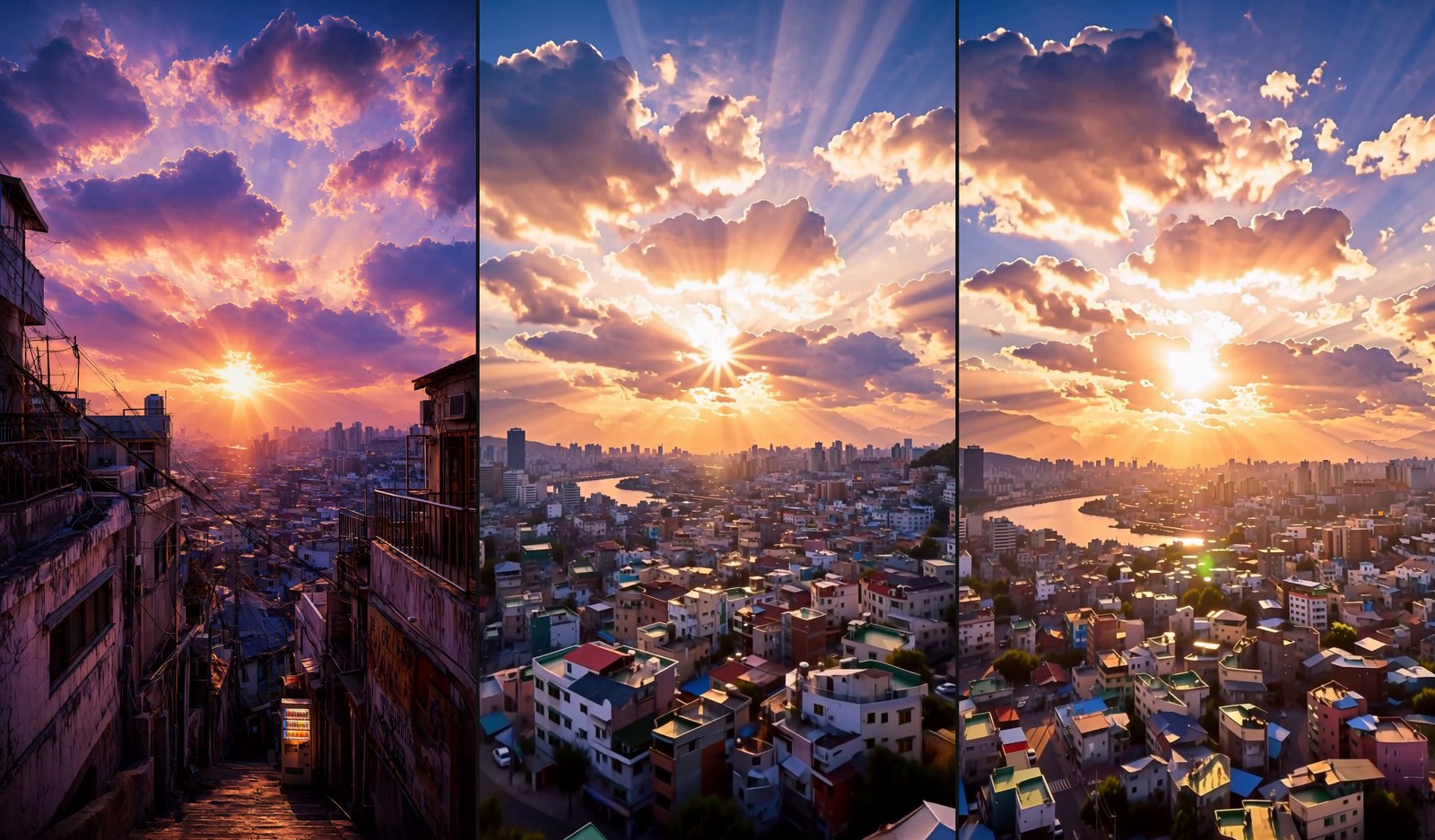
TL;DR — Two KJNodes patches that split H3's attention and feed-forward let a 16 GB RTX 5080 render 1088×1920 portrait video with no out-of-memory errors, at about 876 seconds per 5-second segment. Against LTX 2.5 at the same size, H3 gave 14.5 vs 8.3 edge sharpness and 18.1 vs 8.1 motion. And ClipProj v3.1 shrinks H3's text encoder without a visible change — but what it saves on a single card is RAM, not time.
Yesterday I rendered one of my sunset stills with MiniMax H3 at 768×1344, didn't like it, and switched to LTX 2.5 at 1088×1920 because it looked sharper. The obvious question followed: can H3 do the bigger size too? It can. Here is the exact setup, what it costs, and two things that went wrong on the way — one of which looked like a model problem and wasn't.
The setup that fits in 16 GB
1088×1920 is 2.02 times the pixels of 768×1344, and at 768×1344 H3 was already peaking at 15.1 GB on this card. The H3 node itself sets no ceiling — width and height go up to 16,384 in steps of 32 — so the only wall is memory. Two nodes from KJNodes got over it. The attention one describes itself as doing exactly what you'd hope: "Reduces peak VRAM of the MiniMax H3 attention without changing the math." The other splits the feed-forward the same way. I also switched the decode to the tiled one so 124 frames at 2 megapixels don't have to be unpacked at once.
| 768×1344 | 1088×1920 | |
|---|---|---|
| Time per 5-second segment | about 270 s | 868–950 s (median 876, seven runs) |
| Peak VRAM | 15.1 GB | 15.12–15.44 GB |
| Memory patches | none | feed-forward in 4 chunks, attention in 8 head groups |
So it fits, but you pay in time: roughly 3.2 times longer per segment for twice the pixels, because attention grows faster than the pixel count. A 15-second shot is three segments, so plan on about 45 minutes.
Side by side with LTX 2.5
Same first frame, same camera sentence, both at 1088×1920:
| H3 | LTX 2.5 | |
|---|---|---|
| Edge sharpness | 14.5 | 8.3 |
| Motion | 18.1 | 8.1 |
| First-frame deviation | 3.3 | 3.3 |
| Time per segment | about 876 s | 175–188 s |
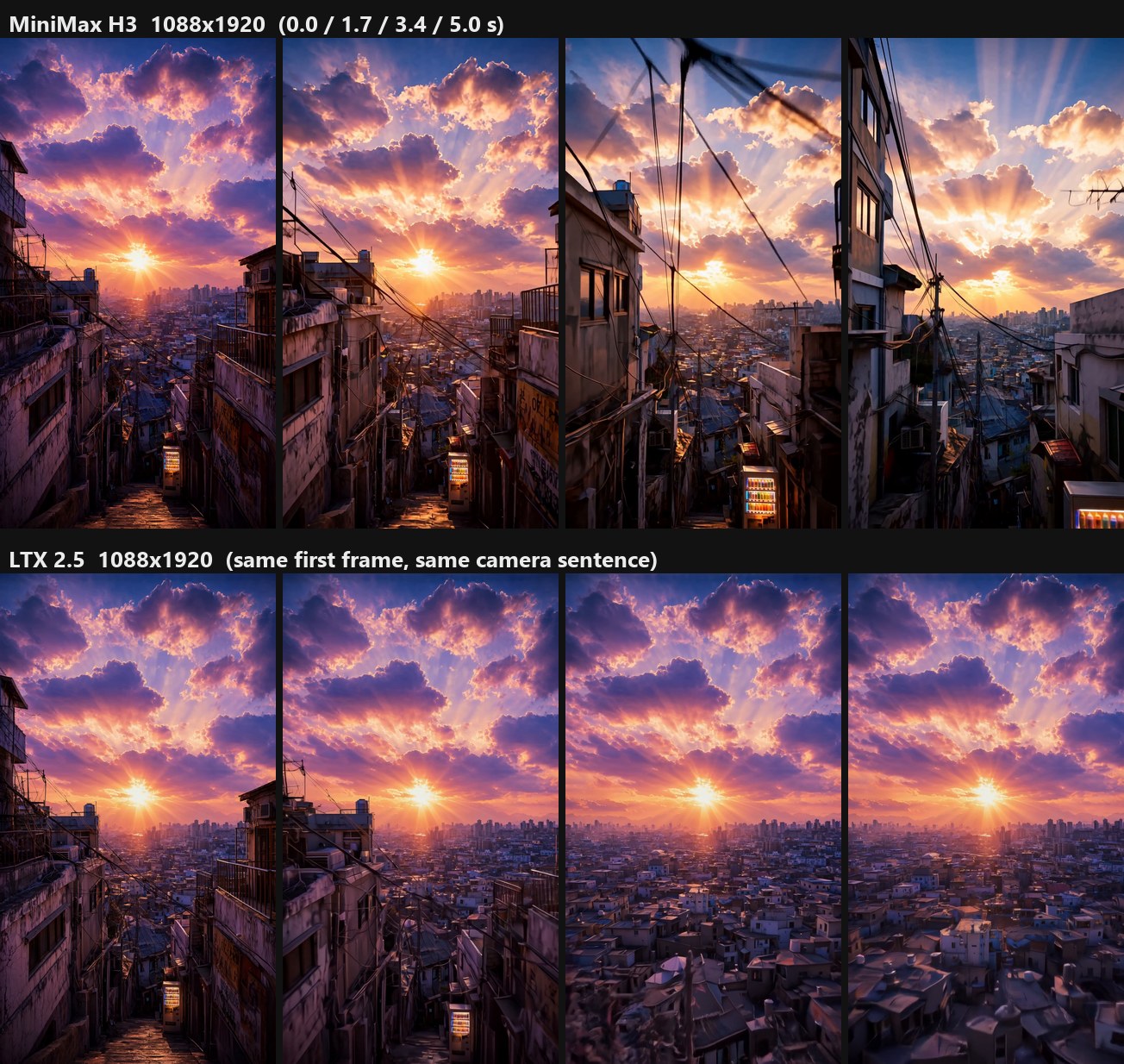
Top row H3, bottom row LTX. Look at the power lines and window frames — that is the sharpness gap.
One honest catch in that comparison: the sentence said the camera "climbs between the buildings", and LTX lifted over the rooftops while H3 pushed forward down the alley instead. H3 was sharper and livelier but read the direction differently. Rewording it as a crane shot — "the camera cranes straight up vertically" — got H3 to rise. LTX is about five times faster, so it still has a place for drafts.
Also worth saying: the H3 clip I disliked yesterday wasn't H3's fault. My script had dropped two blocks from the prompt recipe I'd already tested on this machine — the one asking for "one constant speed ... with clear parallax as the foreground slides past the edges of the frame" and the style line — plus the negative prompt that names "static, frozen, jump cut". With those back, the camera moves through space instead of sliding like a crop.
The camera kept going back down the alley
To reach 15 seconds I chain three segments, each starting from the last frame of the one before. The first finished shot rose out of the alley beautifully, then in the middle five seconds dived straight back into a street. Its motion score, measured in 1.5-second stretches, jumped from about 15 to 41.7.
My first fix was to tell the camera to stay high and never drop into the streets. It did nothing — segment 2 dived again, motion 36.6 against 38.8 before. The real cause was the sentence I put in front of every segment to describe the place: it began "A steep stepped alley...". The camera was already floating above the rooftops, and every segment I kept telling the model this was an alley scene. Once segments 2 and 3 described what was actually on screen — "High above an old hillside city district..." — segment 2 stayed up (motion 15.1) and the whole shot evened out to 15.8.
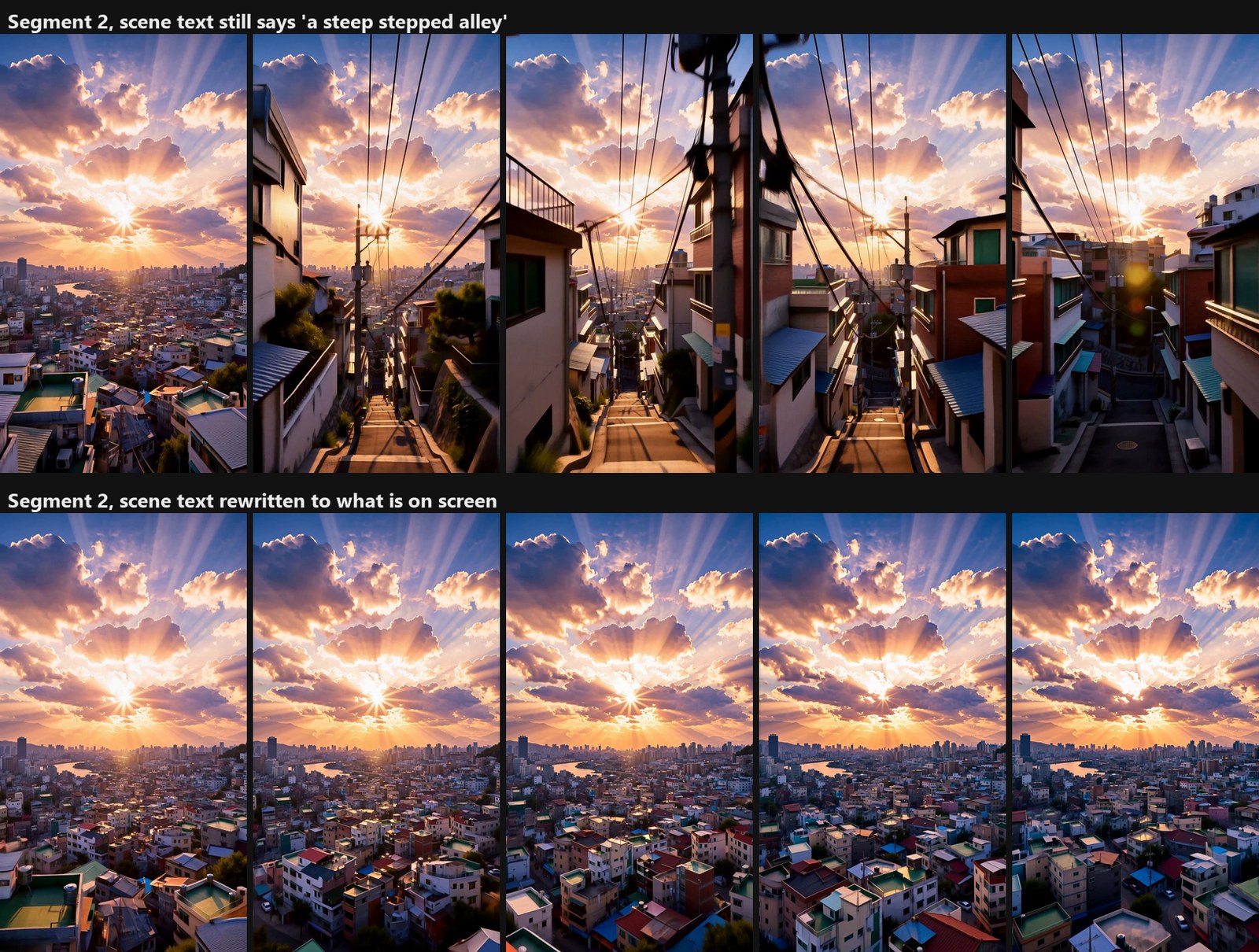
The lesson I'm keeping: when a chain goes somewhere you didn't ask for, check the scene description before you add more camera words. The camera sentence loses that argument.
Two things still aren't right. The last segment levels off instead of climbing into the clouds, and in the first few seconds the look shifts from the still's weathered violet and gold to a brighter, cleaner city.
A lighter text encoder: ClipProj v3.1
H3 turns the prompt into conditioning with a big vision-language model. The ClipProj card puts it plainly: "MiniMax H3 uses a Qwen3-VL-32B truncated to 50 layers — 15.7 GB in NVFP4 — solely to turn a prompt into a [seq, 5120] conditioning tensor." ClipProj swaps that for a 5.2 GB Qwen3-VL-4B plus a 26 MB learned projection. I ran it on the exact prompt, seed and size as the 32B:
| 32B encoder | 4B + ClipProj | |
|---|---|---|
| Motion | 15.1 | 14.5 |
| Edge sharpness | 17.9 | 17.8 |
| First-frame deviation | 4.9 | 5.1 |
| Time | 875.9 s | 863.6 s |
| Peak VRAM | 15.39 GB | 15.13 GB |
| Page file at peak | 16.1 GB | 4.7 GB |
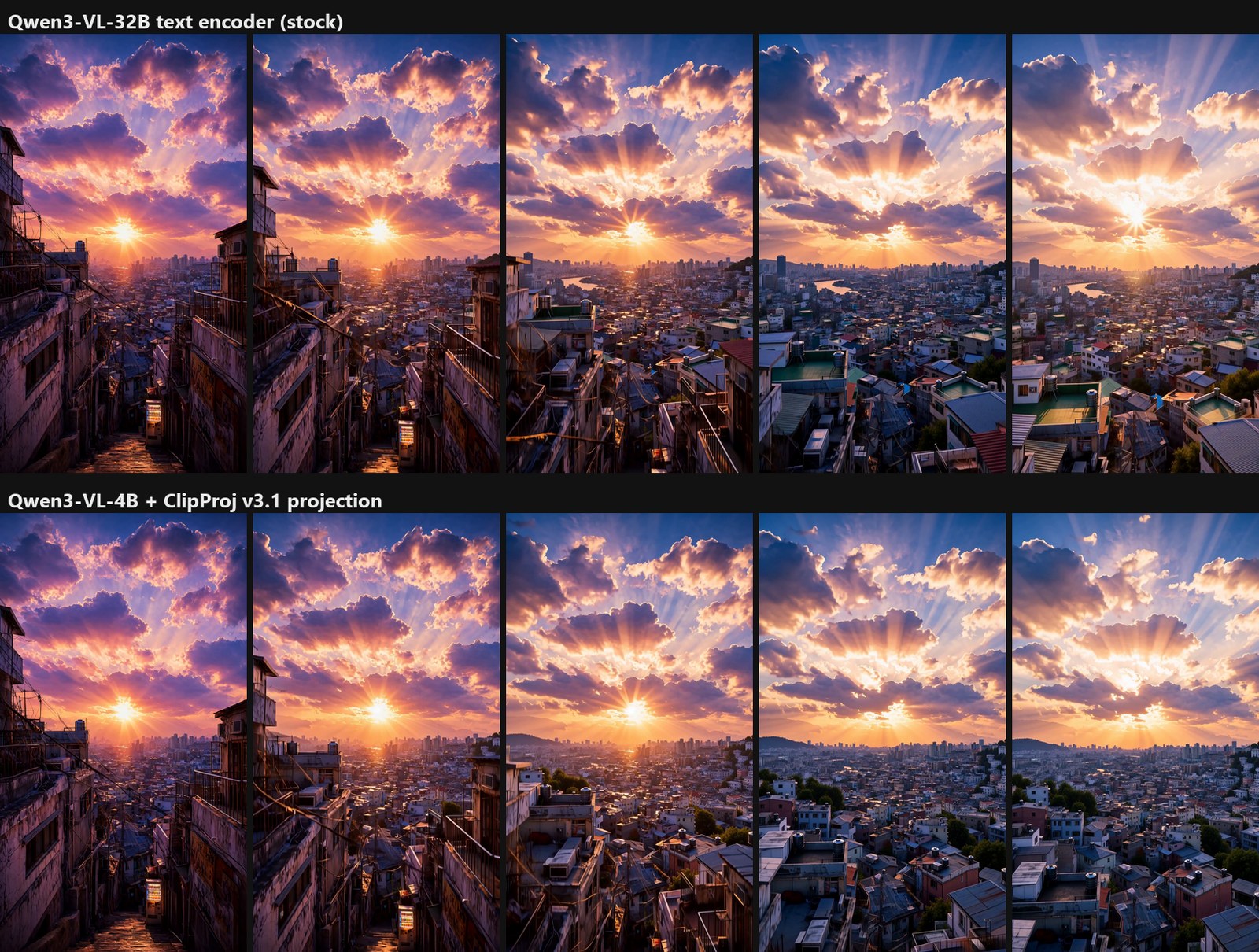
Both clips do the same crane move and I can't pick one on quality. Time and VRAM barely change, because the encoder isn't on the GPU while sampling runs. Where it matters is system RAM: ComfyUI's log stages 14,956 MB for the encoder, 19,995 MB for the video model and 4,965 MB plus 576 MB for the two VAEs — about 40 GB on a machine with 32 GB. Taking 10 GB out of that cut the page file at peak from 16.1 GB to 4.7 GB. That number is flattering, though: the ClipProj run came right after a ComfyUI restart, so less had piled up in swap.
One worry didn't materialise. H3's image-to-video node also hands the first frame to the encoder as a picture — you can see clip.tokenize(prompt, images=images) in the node source — and the projection was fitted on text only; the README notes it works for first-frame runs "although W only ever saw text positions". First-frame deviation moved from 4.9 to 5.1, which is nothing. I'll use it for H3 by default.
Copy these
The three segment prompts and the negative, exactly as run:
# segment 1 — first frame = the source still
A steep stepped alley in an old hillside city district at sunset, weathered walls, iron railings and tangled power lines on both sides, packed old rooftops with water tanks spreading out below, under a huge sky of glowing gold and violet cumulus with broad shafts of sunlight pouring through a break in the cloud. The camera cranes straight up vertically from the alley steps like a rising crane shot, balconies, railings and power lines sliding down out of the bottom of the frame as it lifts clear above the rooftops at one constant speed for the entire shot, never slowing, never pausing, never stopping, with clear parallax as the foreground slides past the edges of the frame. The clouds churn and the shafts of light sweep slowly across the scene. One unbroken take, no cut. Audio: wind and distant city hum, no cuts. Cinematic CG footage with the polish of a modern Unreal Engine 5 render: volumetric light, ray traced reflections, razor sharp detail, deep saturated colour, high dynamic range.

# segment 2 — first frame = last frame of segment 1
High above an old hillside city district at sunset, a vast sea of weathered tiled rooftops, water tanks, antennas and tangled power lines spreading far below toward a river and a distant skyline, under a huge sky of glowing gold and violet cumulus with broad shafts of sunlight pouring through a break in the cloud. The camera glides forward high above the rooftops like a bird, banking gently from side to side, the rooftops sweeping past far beneath it and the sunlit clouds opening up ahead at one constant speed for the entire shot, never slowing, never pausing, never stopping, with clear parallax as the foreground slides past the edges of the frame. The clouds churn and the shafts of light sweep slowly across the scene. One unbroken take, no cut. Audio: wind and distant city hum, no cuts. Cinematic CG footage with the polish of a modern Unreal Engine 5 render: volumetric light, ray traced reflections, razor sharp detail, deep saturated colour, high dynamic range.

# segment 3 — first frame = last frame of segment 2
High above an old hillside city district at sunset, a vast sea of weathered tiled rooftops, water tanks, antennas and tangled power lines spreading far below toward a river and a distant skyline, under a huge sky of glowing gold and violet cumulus with broad shafts of sunlight pouring through a break in the cloud. The camera climbs steadily toward the break in the clouds where the shafts of light pour through, the city shrinking away far below, until it glides up into the glow at one constant speed for the entire shot, never slowing, never pausing, never stopping, with clear parallax as the foreground slides past the edges of the frame. The clouds churn and the shafts of light sweep slowly across the scene. One unbroken take, no cut. Audio: wind and distant city hum, no cuts. Cinematic CG footage with the polish of a modern Unreal Engine 5 render: volumetric light, ray traced reflections, razor sharp detail, deep saturated colour, high dynamic range.

# negative (all segments)
blurry, soft focus, low detail, mushy, washed out, flat lighting, static, frozen, jump cut, scene change, deformed, distorted anatomy, extra limbs, watermark, text, interface
The full node settings, the ClipProj wiring, the frame hand-off commands and how each metric was measured are in the complete appendix.
FAQ
Can a 16 GB card run MiniMax H3 at 1080p-class portrait?
Yes. With the KJNodes feed-forward and attention splitting nodes and tiled decoding, 1088×1920 at 124 frames peaked between 15.12 and 15.44 GB on an RTX 5080 and never ran out of memory. Each 5-second segment took about 876 seconds.
Does splitting the attention change the picture?
I couldn't test that directly — without the patches 1088×1920 doesn't fit — so I'm relying on the node's own description: it reduces peak VRAM "without changing the math". The output looked like H3 at the smaller size, only sharper. Each step is slower.
Why did my chained video fly back down into the street?
Check the scene sentence you repeat at the start of every segment. If it still describes the opening location, the model steers back there no matter what the camera sentence says. Describe what the previous segment ended on.
Is ClipProj worth installing?
If your machine is short on RAM, yes. On one clip the output was indistinguishable and the page file at peak dropped from 16.1 to 4.7 GB. Don't expect a speed-up: it was 12 seconds faster out of 876.
Sources: MiniMax H3, Comfy-Org H3 repackage, ComfyUI H3 guide, H3 node source, KJNodes, LTX 2.5, ClipProj model card, ComfyUI-ClipProj, Qwen3-VL-4B fp8 from Krea-2.
Images and video: frames from the author's own renders on an RTX 5080. The first frame is a still generated locally with Qwen-Image 2.1.
← Back to all posts